Bloom Vocal AI Coaching Report Example: How to Read Five Scores
See Bloom Vocal's sample analysis screen and learn to read its five coaching scores as feedback for one recording, not as a diagnosis.
Written by
Vocal Learning Editorial Team
The team writes and edits Bloom Vocal content about singing and vocal practice. This profile does not list individual contributors, credentials, or clinical reviewers.
TL;DR
Bloom Vocal AI coaching reports five axes, each scored out of 20: breath support, pitch accuracy, tone/register, rhythm, and expression. Read them as practice feedback for one recording, not a diagnosis or a promise of improvement.
Bloom Vocal AI coaching reports five axes, each scored out of 20: breath support, pitch accuracy, tone/register, rhythm, and expression. Use the result as practice feedback for the recording you just made, not as a diagnosis, a vibrato score, or a guarantee that a particular exercise will change your voice.
Safety note: If your voice feels tired or hoarse, skip singing practice and rest. NIDCD advises avoiding singing when your voice is hoarse or tired.[1] Stop any activity that causes discomfort and seek qualified guidance for ongoing concerns.
Why a coaching result is a starting point
A coaching report gives you a way to review a specific performance. It does not describe every part of your singing, explain why a result appeared, or predict how quickly a skill will change. A single number alone should not decide what is wrong or which exercise fits; consider the full report and the recording context.
To make the report useful, keep the question small: What did I sing? What did the report show? What did I hear when I replayed it? If you later compare a similar passage, treat that as another observation, not proof of a diagnosis or guaranteed progress. The AI coaching score interpretation guide offers a related perspective on reading session feedback.
What Bloom Vocal's AI coaching reports
The report presents five coaching axes, each on a /20 scale. These are separate areas of practice feedback:
| Axis | How to use the feedback |
|---|---|
| Breath support | Review the report alongside the phrase and exercise you performed |
| Pitch accuracy | Listen back to how the sung pitches relate to the exercise or song |
| Tone/register | Notice the tone and register feedback in the context of that task |
| Rhythm | Compare the timing feedback with the passage you sang |
| Expression | Reflect on the expressive choices made in that recording |
Example report screen
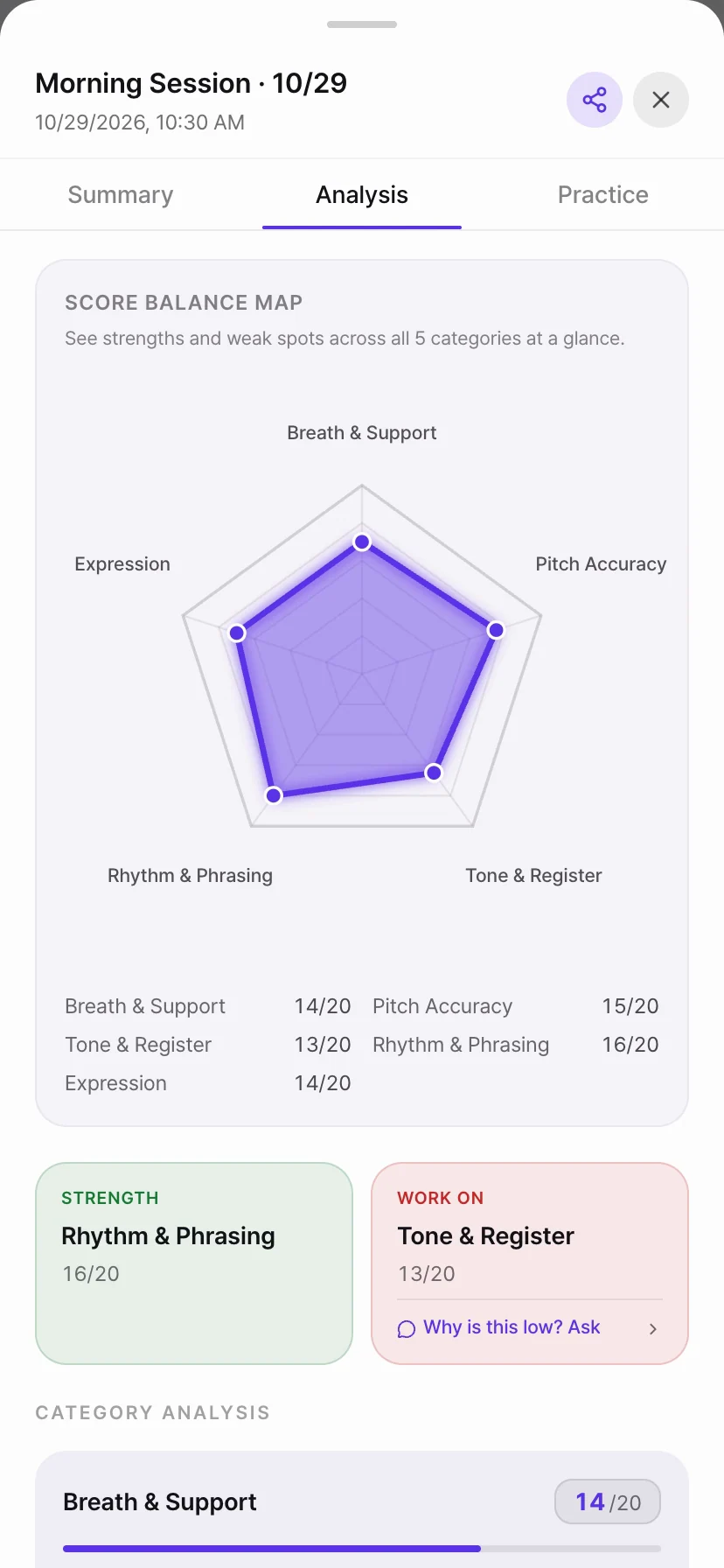
This is the app's actual interface, but the displayed scores and feedback are demo data. They illustrate the report layout, not an individual assessment or a typical outcome.
The scores do not provide a vibrato score. Bloom Vocal's D-9 is a separate live-microphone pitch measurement tool: it displays vibrato rate in Hz and width in cents. Some D-9 steps that include a target show a comparison band; the band is specific to that step, not a general standard. For details about recorded pitch feedback, see the pitch detection accuracy guide.
A score is not a clinical assessment. ASHA describes voice-disorder assessment as a comprehensive process involving clinical and instrumental evaluation.[2] If you have an ongoing voice concern, use qualified human guidance rather than interpreting an app score as a diagnosis.
A five-step way to review your result
This short activity helps you decide what question to explore next. It does not set a practice duration or require a follow-up test. You can stop after any step.
Step 1: Identify the recording
Note which passage and exercise you just completed. A coaching result is easier to interpret when you know what the microphone captured and what task you were doing.
Checkpoint: You can name the exercise or passage linked to the report.
Common mistake: Comparing a result with an unrelated song or task as if the scores measured the same performance.
Step 2: Read all five axes
Review breath support, pitch accuracy, tone/register, rhythm, and expression. Each is scored out of 20. Take in the full report before deciding what to work on; there is no threshold here that defines a “good” or “bad” voice.
Checkpoint: You can describe the report without reducing it to one total or category label.
Common mistake: Treating the lowest axis as a diagnosis or the only factor in choosing an exercise.
Step 3: Listen to the recording
Replay the same recording and note one audible detail that relates to your practice goal. You might write, “I want to listen more closely to the phrase ending,” or “I want to check the rhythm of this line.” Keep the observation neutral and avoid guessing at a physical cause.
Checkpoint: Your note says what you heard or want to explore, not why you assume it happened.
Common mistake: Making a medical or technical conclusion from a score alone.
Step 4: Choose an appropriate next activity
If the app suggests a catalog exercise, review its instructions and the recording context before starting. A low score by itself does not establish a fixed one-to-one code; you can also choose another activity that fits your goal. If your question is specifically about vibrato, D-9 can provide live pitch measurements during supported steps; it remains a practice reference, and not every step has a target band.
Checkpoint: You know what the activity is intended to practice before starting it.
Common mistake: Assuming a low axis identifies the cause or guarantees that a matching drill will fix it.
Step 5: Make an optional comparison
If you want to review the result again later, use a similar passage and recording setup where practical. Compare what the report shows and what you hear, while remembering that each recording is only one sample. You do not need to repeat a session on a fixed schedule.
Checkpoint: You have one observation to carry forward, or you have decided to stop for now.
Common mistake: Expecting a specific score increase or treating a small difference as proof of improvement.
For another guide to using feedback in practice, see how to use AI vocal feedback.
Adjust your next step to the situation
| Situation | Practical response |
|---|---|
| The report is unfamiliar | Review the axis labels and the passage you recorded |
| One score draws your attention | Check it against the recording before choosing a practice question |
| You are unsure which exercise fits | Read the exercise instructions or ask a voice teacher |
| You want to compare sessions | Use a similar task when practical and describe differences cautiously |
| Your voice feels tired or hoarse | Rest rather than sing, following NIDCD voice-care guidance[1] |
Use Bloom Vocal's tools with the right context
Bloom Vocal AI coaching returns five /20 axes: breath support, pitch accuracy, tone/register, rhythm, and expression. It does not provide a vibrato score or diagnose a voice condition. A low axis alone does not imply a fixed exercise code, though the app may suggest a catalog activity using the target axis and session context.
D-9 operates separately from AI coaching. It uses live microphone input to display vibrato rate (Hz) and width (cents), with a comparison band only in some target-bearing steps. D-1 is a diaphragmatic pulse exercise, D-2 practices half-step vibrato, and D-5 moves from straight tone into vibrato. E-1, E-2, and E-3 are resonance exercises, not vibrato-analysis tools. Follow each activity's own instructions and stop if it feels uncomfortable; no tool or exercise guarantees a particular result.
FAQ
What do the five AI coaching scores represent?
Bloom Vocal reports breath support, pitch accuracy, tone/register, rhythm, and expression, each scored out of 20. They describe one coached recording; there is no vibrato score.
Is there a passing score for AI vocal coaching?
There is no universal pass threshold in this guide. Read each axis as feedback about the recording and exercise, not as a grade of your voice or ability.
Can a low score tell me which exercise code to use?
A low score alone does not establish one fixed exercise code. Bloom Vocal may suggest a catalog exercise using the target axis and session context; review its stated task and choose what feels comfortable.
How should I compare coaching results over time?
Review similar passages and recording conditions when practical, then describe what changed in the feedback and what you hear. A comparison does not guarantee improvement.
Should I sing if my voice feels tired or hoarse?
A tired or hoarse voice is a reason to rest rather than sing. NIDCD advises avoiding singing in either condition; seek qualified care for ongoing voice concerns.
References
- National Institute on Deafness and Other Communication Disorders (NIDCD). Taking Care of Your Voice. https://www.nidcd.nih.gov/health/taking-care-your-voice
- American Speech-Language-Hearing Association (ASHA). Voice Disorders, Practice Portal. https://www.asha.org/practice-portal/clinical-topics/voice-disorders/
Review One AI Coaching Result in Five Steps
An estimated short report-review activity, not a daily practice prescription.
Total time: PT5M
- 1
Step 1: Identify the recording
Note the passage and exercise you just completed so the feedback has a clear context.
- 2
Step 2: Read all five axes
Review breath support, pitch accuracy, tone/register, rhythm, and expression as /20 feedback.
- 3
Step 3: Listen to the recording
Choose one audible detail to compare with the report without assuming a cause.
- 4
Step 4: Choose an appropriate next activity
If the app suggests an exercise, review its stated task and recording context. A low score alone does not establish a fixed one-to-one code.
- 5
Step 5: Make an optional comparison
If useful, repeat a similar passage later and describe the feedback without expecting a result.
Frequently asked questions
Review recording feedback
Use AI feedback on your recording as one reference for choosing a next practice step.
Pain, hoarseness, or sudden voice changes? Stop singing and contact a clinician.
Explore practice tools